> ## Documentation Index
> Fetch the complete documentation index at: https://docs.moverse.ai/llms.txt
> Use this file to discover all available pages before exploring further.
# Streaming
## Streaming Motion Capture Data to Unreal Engine
Moverse Studio provides the capability to stream motion capture (mocap) data directly to Unreal Engine through Live Link.
This feature allows for real-time visualization and interaction with mocap data within the Unreal Engine environment.
Follow these steps to set up and start streaming:
### Step 1: Initiate Streaming
* Locate and press the **Streaming** button at the main bar of the studio interface to open the streaming controls.  ### Step 2: Configure Streaming Settings
* The streaming container will appear.
You can add a new stream by pressing **"New connection"**.
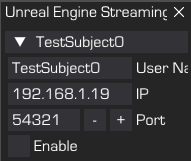
Then, you can set the following parameters:
* **Stream Name**: Enter a name for your stream to identify it within the network.
* **IP**: Input the IP address where you want to send the mocap data.
* **Port**: Specify the port number for the data stream.
### Step 2: Configure Streaming Settings
* The streaming container will appear.
You can add a new stream by pressing **"New connection"**.
Then, you can set the following parameters:
* **Stream Name**: Enter a name for your stream to identify it within the network.
* **IP**: Input the IP address where you want to send the mocap data.
* **Port**: Specify the port number for the data stream.
 ### Step 3: Start Streaming
* Once all settings are configured, click **Enable** begin streaming the mocap data.
* The stream name will be highlighted to indicate that streaming is active.
### Step 4: Configure Unreal Engine
* To ensure that Unreal Engine properly receives and processes the mocap data, follow the detailed instructions available in the plugin [here (UE5 Plugin)](../../sections/plugins/ue5).
### Conclusion
By following these steps, you can seamlessly integrate Moverse Studio’s motion capture data into Unreal Engine for real-time visualization. This setup is ideal for developers and creators who need dynamic interaction with mocap data in their projects.
### Step 3: Start Streaming
* Once all settings are configured, click **Enable** begin streaming the mocap data.
* The stream name will be highlighted to indicate that streaming is active.
### Step 4: Configure Unreal Engine
* To ensure that Unreal Engine properly receives and processes the mocap data, follow the detailed instructions available in the plugin [here (UE5 Plugin)](../../sections/plugins/ue5).
### Conclusion
By following these steps, you can seamlessly integrate Moverse Studio’s motion capture data into Unreal Engine for real-time visualization. This setup is ideal for developers and creators who need dynamic interaction with mocap data in their projects.